.png)
Quiz Marketing: How It Works and How It Helps to Get More Leads
Most marketing funnels break at the same point. You get the click, maybe even a bit of interest, but then the user stalls. Too many options, not enough clarity. Quiz marketing fixes by helping structure the decision process earlier, before users drop off.
In this article, we’ll break down how quiz marketing works, what makes it different from standard lead generation methods, and how it impacts lead quality and campaign performance. We’ll also walk through how to build your own quiz step by step, so you can apply it in practice.
What Is Quiz Marketing?
Quiz marketing takes a different approach to lead generation – it gets people involved instead of just asking them to sit back and read. What sets this approach apart is the integration of interactive quizzes into the marketing funnel.
A quiz marketing funnel guides potential customers from their first interaction through to conversion, using these engaging tools as both participation mechanisms and data collection methods. The beauty is that these assessments can meet clients at any stage – whether they're just becoming aware of a brand, considering options, or ready to decide.
By providing visitors with an engaging and personalized experience, quiz marketing boosts performance and lowers cost per acquisition. As a result, it often outperforms static content, with conversion rates reaching 30–40%, a range commonly seen in applied marketing scenarios.

Interactive content boosts your conversion rate, reduces bounce rate and increases referral traffic
At its core, quiz marketing changes how information is delivered. Instead of presenting everything at once, it unfolds gradually, which makes the interaction easier to follow.
How Quiz Marketing Works
A quiz leads users through a structured process. Each step plays a specific role in moving potential customers closer to a final decision.
The Quiz Funnel Steps
The quiz funnel typically includes the following stages:
Attraction. Someone sees your quiz through an ad, website popup, or social post and clicks because the headline catches their attention. Maybe it's "Find Your Perfect Skincare Routine" or "What's Your Business Growth Blocker?" The goal here isn't to sell – it's to spark curiosity.
Engagement. They answer some questions about their needs, preferences, or challenges. Each question reveals more about what they're looking for. For example, an online course quiz might ask about skill level, budget, and available time. The quiz adapts as they go, showing different follow-up questions based on previous answers.
Lead Capture. Just before showing results, you ask for their email or phone number. They've already invested time answering questions, so they're motivated to see what comes next – especially if you promise personalized recommendations or a discount.
Conversion. The results page shows a tailored offer based on their answers. Instead of a generic "here's what we sell" message, they see exactly what fits their situation. A beginner with a tight budget gets a starter package, while someone ready to scale sees premium options.
Follow-up. Even if they don't buy immediately, their quiz responses become the foundation for targeted emails, retargeting ads, or sales team outreach.
Benefits of Quiz Marketing for Business
Quizzes work because they solve problems that standard forms don’t:
Involving and Warming Leads
Standard forms often capture contacts without much context, which makes it harder to understand how interested or prepared a lead actually is. Quizzes, on the other hand, create a more gradual entry point, allowing participants to move forward only if they find the process relevant to their situation.
We’ve seen that when users are asked for contact details too early, many drop off or provide low-quality information. But when the same request comes after a short quiz, people are more likely to complete it because they already expect a useful outcome. The leads generated this way tend to be more responsive and easier to work with.
Getting Higher Level Quality Leads
Quizzes increase lead quality by building on the structured process described above, helping businesses identify high-intent prospects before they reach the sales stage.
For example, a quiz can include a cost calculation step where only people comfortable with the pricing will move forward and provide their contact details. Adding questions about delivery timelines, project scope, or specific requirements further filters out casual inquiries and highlights those more likely to proceed.
This filtering effect is not just theoretical. From our work with 1000+ clients, quizzes that include a budget qualification step can reduce low-intent leads by 40–50%, making the sales process significantly more efficient.
Each completed quiz acts as a natural pre-qualification layer. Sales teams can focus on leads that better match the offer, reducing time spent on low-fit contacts and improving overall pipeline efficiency.
Increased Conversion Rates
Quizzes can get better results because prospects reach the final stage with clearer expectations and a more relevant offer. This reduces uncertainty and makes them more likely to take action compared to visitors on a standard landing page.
This effect was evident in an e-commerce brand in the home fitness niche. They added a quiz to recommend equipment based on customers’ goals, available space, and budget. Instead of browsing a full catalog, visitors received one or two tailored options. The share of visitors who completed a purchase increased from 2.9% to 8.7% within two months, representing a threefold improvement, as the decision process became simpler and more focused.
Better Personalization in Marketing
As mentioned earlier, quizzes collect detailed input from respondents, which makes businesses move beyond generic messaging. Instead of sending the same message to everyone, companies can adjust their communication based on the responses they receive.
This approach can also be applied at a broader level by segmenting audiences into “price-sensitive,” “researching,” or “ready to buy” groups and tailoring email flows or remarketing campaigns accordingly.
💡 Marquiz offers more than 300 integrations with various services, allowing you to work with any customer database.
Expanded Social and Viral Reach
Quizzes naturally extend brand exposure by encouraging organic sharing. A fun or insightful result can easily spread on social media, bringing in new audiences who might not have discovered the brand otherwise. We’ve seen users share quiz results like “Your marketing style is data-driven strategist” or “Your perfect skincare routine,” turning them into conversation starters among friends and colleagues.
Unlike traditional ads that often get ignored, quiz results feel more like something people want to share, increasing visibility through user-driven promotion.
How to Make a Quiz: Step-by-Step Guide
A well-designed quiz is a powerful lead generation tool. But to get desired results, you need to build it the right way. That means having clear goals, structuring it well, and making sure it actually delivers value to both your audience and your business.
Build your quiz now and start turning visitors into buyers!
Marquiz is a platform designed to simplify the process. It gives you all the tools to create interactive quizzes, test different approaches, and even start collecting leads for free. New users get up to 10 free leads in their account, so they can easily experiment, install the quiz, and connect ads.
Here’s a step-by-step guide on how to create a quiz using Marquiz builder:
Step 1: Define Clear Goals
Start by deciding what you want the quiz to achieve. This will determine the questions, logic, and final outcome.
For the customer:
- Save time finding the right products or services
- Get recommendations based on their needs
- Receive useful insights or advice
For the company:
- Collect high-quality leads
- Segment the audience for more targeted marketing
- Test new products, services, or messaging strategies
Each answer in your quiz can help you build a lead scoring system – ranking users by interest level, budget, or intent. High-scoring leads can be passed directly to sales, while lower-scoring ones can enter nurturing campaigns.
By defining your goals upfront, you’ll create a quiz that actually drives meaningful results.
Step 2: Set Up the Start Page or Marquiz Pages
Once you’re in the Marquiz editor, you can create, configure, and preview your quizzes. To sign up, you can register with your email or use the quick sign-in option via Google.

You can start building your quiz from scratch or use a template from the gallery. If you want to speed up the process, you can also use an AI-powered template generator, which will create a structured quiz with relevant questions and an offer within a minute.

There's a vast gallery of ready-to-use quiz templates
There are two main setup options for a quiz:
- Start Page – A simple intro page that leads straight into the quiz.
- Marquiz Pages – A more detailed landing page with additional business info and a call-to-action button linking to the quiz
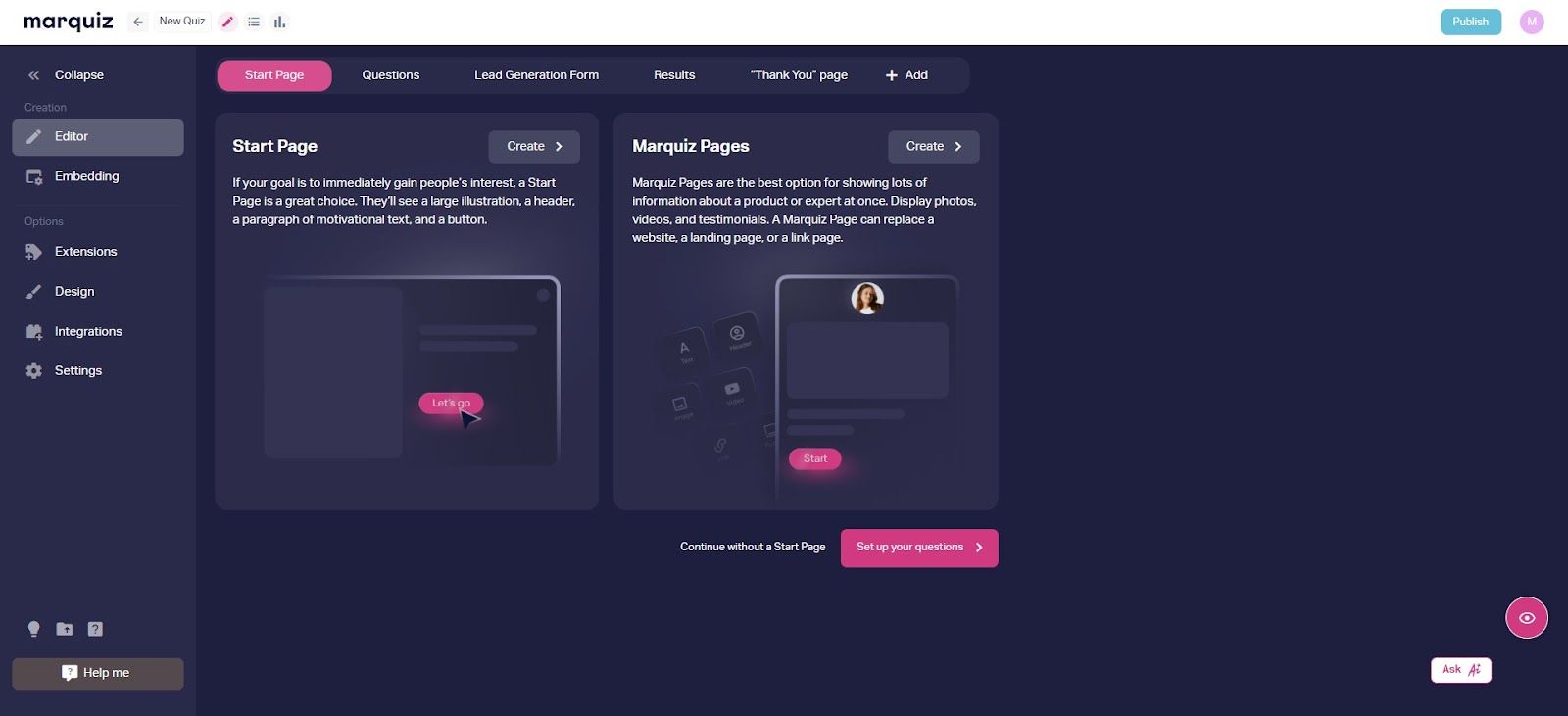
If you want visitors to jump right into the questions, you can disable the start page. But if you need to introduce your brand, product or an expert first, Marquiz Pages gives you space to add extra details.
To make your start page as effective as possible:
- Add an appealing image (from your own files or free libraries like Unsplash).
- Write a clear, compelling headline that explains what the quiz is about.
- Use a strong call-to-action button to encourage users to begin.
- Include basic business details (phone number, company name, website) for credibility and smoother ad moderation.
- Optionally, add your logo and contact info to reinforce trust.
- Offer small incentives for completing the quiz – such as a personalized report, free consultation, or exclusive discount.

An example of a start page of a quiz
Step 3: Create Questions and Answers
To keep things interesting, mix up the question formats:
- Multiple-choice for quick, simple answers.
- Sliders for selecting a preference or level (e.g., budget, experience).
- Image-based answers for a more visual and engaging format.
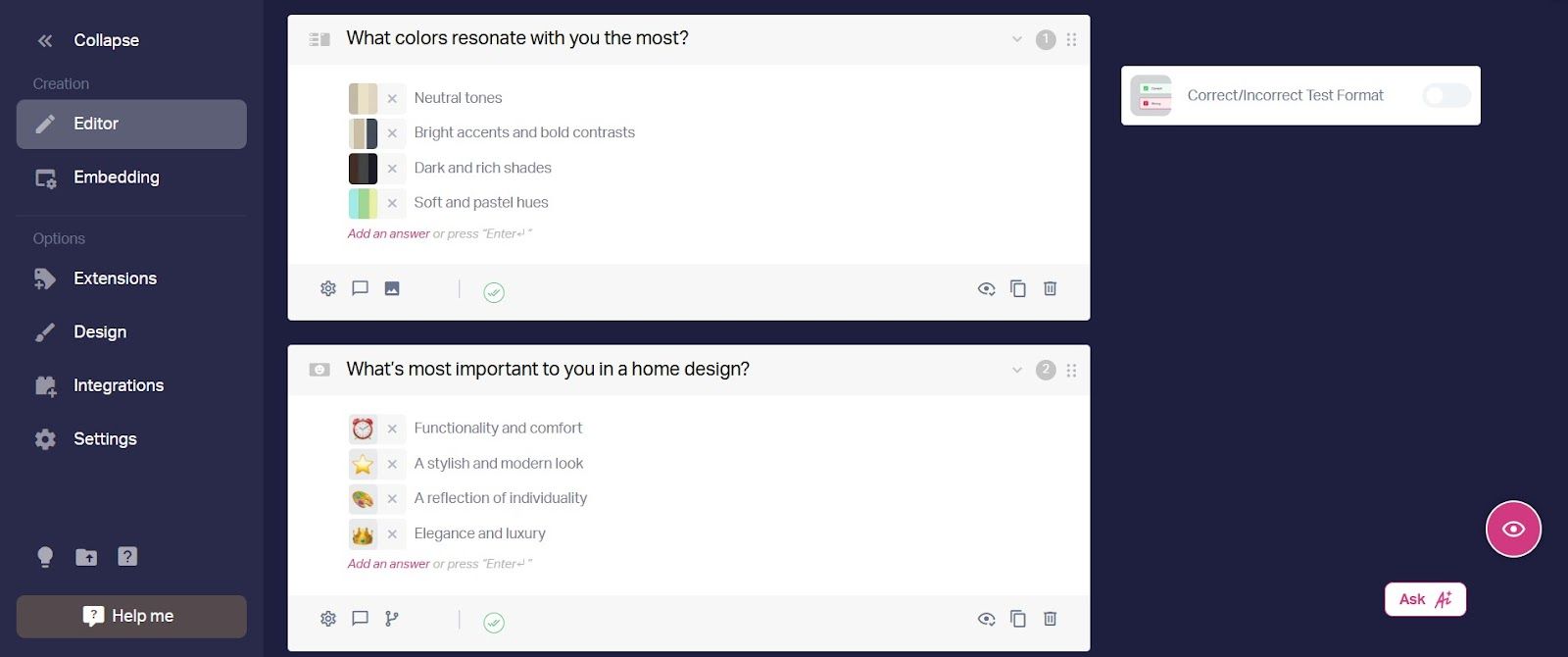
You can use standard questions that managers typically ask new clients
Marquiz provides 12 different question types, so you can choose the ones that fit your quiz best. You can also add images and icons to make it feel more interactive.
Step 4: Configure the Results Page
The results page is where your quiz delivers value. It’s not just about giving people an answer – it’s about reinforcing your offer and driving action.

Some ways to optimize your results page:
- Show the result before or after the contact form (whichever converts better for your audience).
- Make the results feel personal – the more relevant they are, the higher the chances of conversion.
- Include a special offer like a discount code or limited-time deal to encourage immediate action.
- Provide a short explanation linking the user’s answers to the recommended product or service.
- Encourage social amplification by making results visually appealing – add shareable images, short summaries, or badges customers can post. Use built-in sharing buttons to expand your quiz’s organic reach.
Step 5: Add a Contact Form
This is the part where you collect leads, but it’s also where people are most likely to drop off. Filling out the form shouldn’t feel like too much work. Keep it simple and make it clear why it’s worth their time.
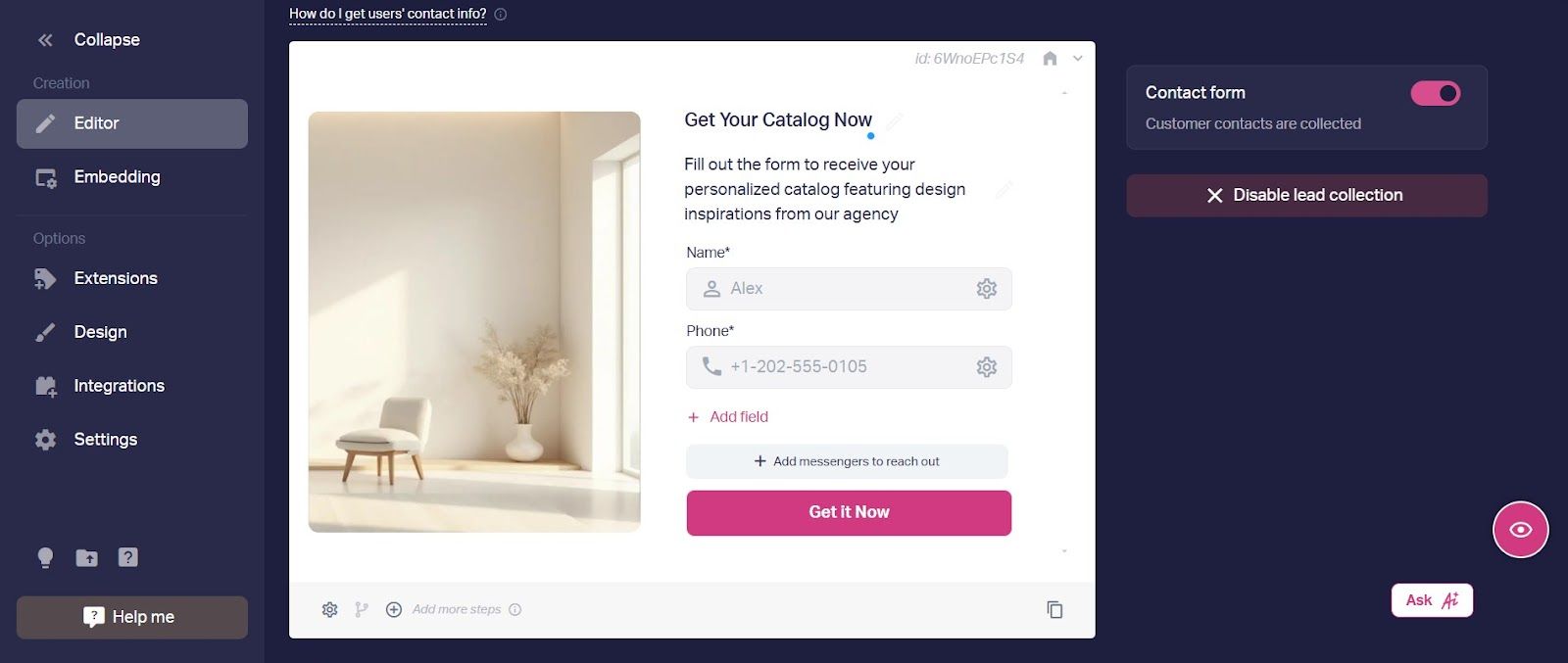
You can offer just messaging options for contact. Typically, people prefer texting over phone calls
Here’s how to make your contact form most effective:
- Keep the offer consistent. If you introduced a special offer or incentive on the start page, mention it again here to reinforce the value.
- Clearly explain why users should share their contact info (e.g., “Get your personalized results instantly!”).
- Tell them what they’ll get in return (e.g., “Access exclusive discounts and expert recommendations.”).
- Keep it short
- Split the process into two steps: First, ask for contact info. Then, if needed, request their name.
- Use autofill options to make entering details as easy as possible.
Now, your quiz is technically ready to go, but if you want the strongest impact, there’s still something to be done.
Step 6: Fine-Tune Your Quiz
Even the smallest of tweaks can make a big difference in how people move through the quiz and whether they complete it.
Here’s what you can do:
- A/B test different question orders, formats, and images to see what works better.
- Analyze drop-off points to find where people are abandoning the quiz. These are usually long text questions, unclear instructions, or too many required fields. Shorten or rephrase those steps to reduce abandonment and provide a higher completion rate.
- Refine your call-to-action buttons and offers to make the next step clearer and more appealing.
- Adjust the results page so that it better reflects user responses and delivers more useful outcomes.
Once you’ve fine-tuned everything, it’s time to share your quiz. You can add it to your website, post it on social media, send it through email, or even embed it in Telegram.
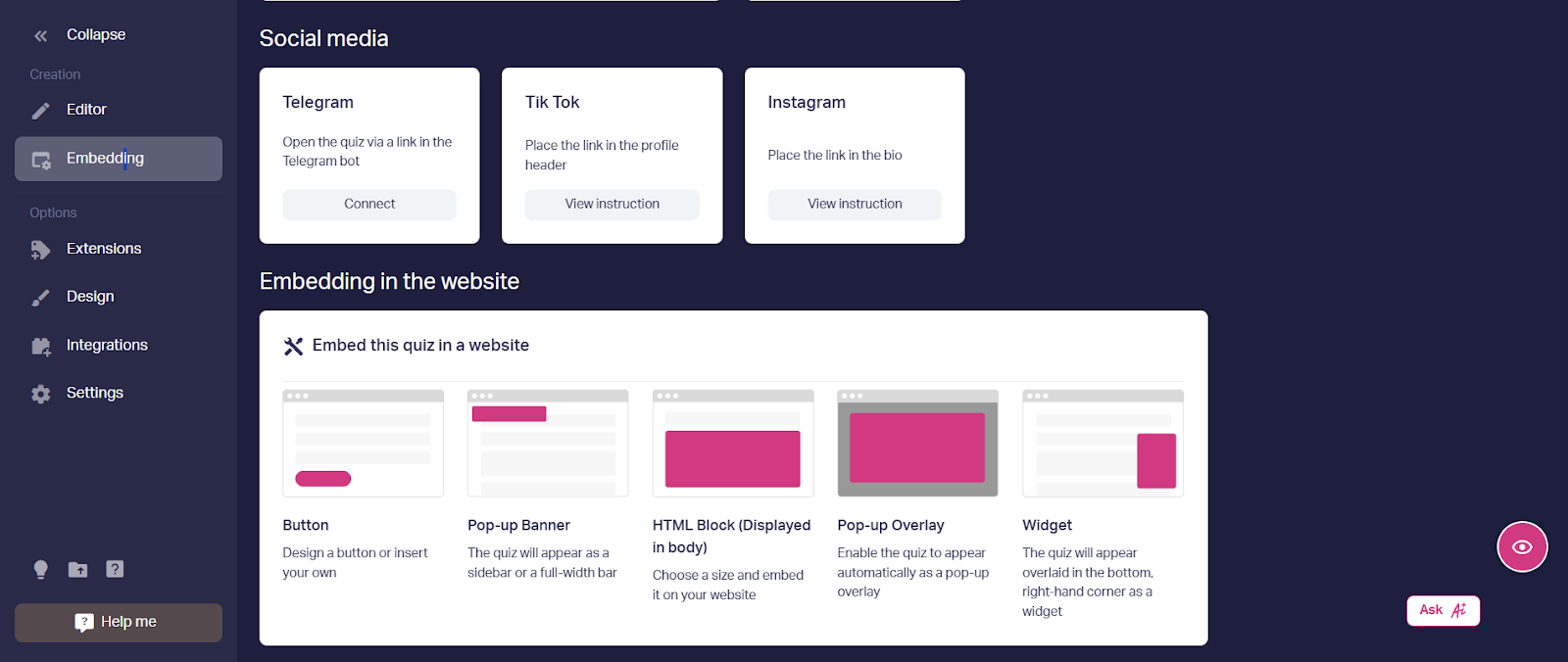
Don’t limit yourself to just one platform – the more places you share your quiz, the better.
How to Boost Quiz Completion and Conversions
Getting people to start your quiz is one thing. Getting them to finish it and take action? That's where the real work begins. Here's what actually moves the needle.
Make the Results Worth Finishing For
People need a clear reason to finish the quiz. The final page should give them something useful, not just a generic “thanks for participating” message.
Use their answers to show a relevant recommendation instead of a full product catalog. For example, if someone mentions dry and sensitive skin, show a suitable routine with specific products, not your entire catalog. Add a direct link to buy, book a consultation, or request more details.
As mentioned before, an incentive also helps a lot. Make sure you show this offer on the start page so expectations are clear from the beginning.
Optimize Your Contact Form
We’ve already covered what makes a good contact form, so now it’s about putting those principles into practice. Keep it simple: ask for only one field and clearly explain what the user will get in return.
It can also help to test when you show the contact form. From experience, showing a short outcome first and then offering additional details or bonuses in exchange for contact information tends to work better.
To further reduce hesitation at this point, you can add small trust signals such as “No spam, unsubscribe anytime” or “Join 10,000+ customers.”
Design for Momentum
Start with easy, visual questions that people can answer in seconds. Save the tougher or more personal questions for later, when they're already invested. Use a progress bar so they know how close they are to finishing – "2 of 6 questions" keeps them going.
Keep your quiz to 5-8 questions maximum. If you need more data, use branching logic to skip irrelevant questions. Someone shopping for themselves doesn't need to answer questions about gift recipients.
Add answer options like "I'm not sure" or "Skip" for questions that might stump users. A stuck user is a user who abandons the quiz.
A lot of drop-offs happen not because the idea is wrong, but because of small execution mistakes. Here are the most common ones to avoid:
Avoiding these pitfalls often has a bigger impact on completion rates than adding new features.
Best Practices for Quiz Marketing
To get the most out of your quiz, you need to go beyond just creating it and hoping for the best. Here are ten practical ways to optimize your quiz marketing strategy and turn it into a reliable source of leads and sales:
1. Test Different Unique Selling Propositions (USPs)
Not all selling points resonate the same way with every audience. Use quizzes to experiment with different USPs: are your customers more drawn to affordability, exclusivity, or convenience? By testing various value propositions, you can see which ones lead to more responses and better results. The insights you gather here can help refine your messaging not just for quizzes but across all your marketing channels.

2. Test Different Types of Questions in Quiz Surveys
Avoid monotony. Do not stick to simple multiple-choice questions – mix things up. Try sliders for rating preferences, image-based selections for a visual touch, or ranking options for prioritization. You can even include a few open-ended questions for deeper insights. The more interactive the experience, the more likely users are to stay engaged and complete the quiz.

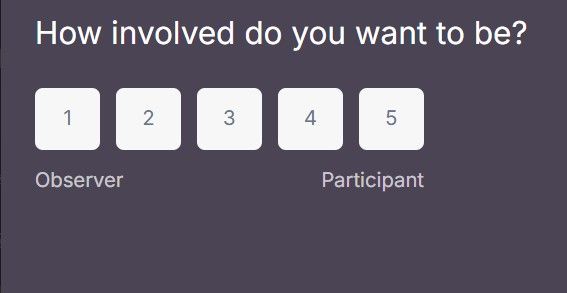
Use various types of questions to keep users interested
3. Experiment with Different Visual Quiz Templates
The design of your quiz, including color schemes, fonts, button placements, and images, plays a key role in keeping audiences interested. It’s easy to underestimate this, but visual friction is one of the fastest ways to lose attention.
Test different templates and layouts to see what aligns best with your brand and audience. A polished and visually appealing quiz creates a strong first impression.
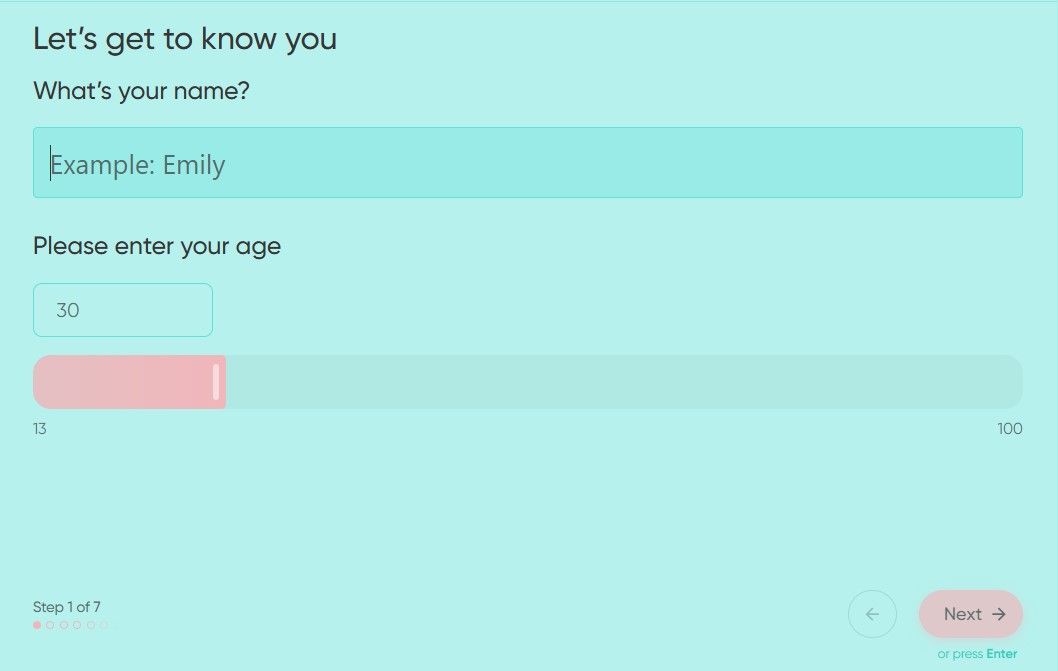

Make sure colors and layouts suit your brand or the topic
4. Test Visitors with a Lead Quiz That Captures Emails
As covered in previous sections, quizzes can be used to collect contact details, but they also help identify which visitors are more interested in your offer. By looking at who completes the quiz and leaves their email, you can better understand the quality of your traffic and adjust your targeting accordingly.

Always make clear what your potential customer will get in return after entering their e-mail
5. Add a Calculator to Your Website
Tools that provide clear, immediate outcomes tend to work best. A quiz-based calculator, whether for pricing, ROI, or product selection, builds on the principles discussed above. It turns the quiz into something more practical, not just a set of questions. Users get a result they can apply right away. This increases the chances they return or share it.

6. Use Conditional Logic for a More Personalized Experience
A one-size-fits-all quiz can feel generic. Instead, use conditional logic to adjust questions based on previous answers. This keeps the flow focused and ensures users only see what applies to them.
For example, if a person selects “small business,” you can ask about budget and goals. If they choose “enterprise,” shift the focus to integration and scalability. This way your quiz will feel more natural and help them move through it more easily.
7. Encourage Social Sharing
A great quiz doesn’t just engage the person taking it – it sparks curiosity in others. Add social sharing buttons to encourage users to post their results on platforms like Facebook, Twitter, or LinkedIn. Make sure the results are share-worthy by using interesting, funny, or insightful descriptions. You can even offer a discount or a bonus entry into a giveaway to boost sharing.

8. Offer Incentives for Quiz Completion
Incentives have already come up as one of the key drivers behind quiz performance. A small reward, such as a discount, free resource, or access to exclusive content, can give potential customers that final push to finish.
In our experience, overly complex or aggressive incentives reduce trust rather than lead to higher completion, so the offer should stay genuinely useful and straightforward.
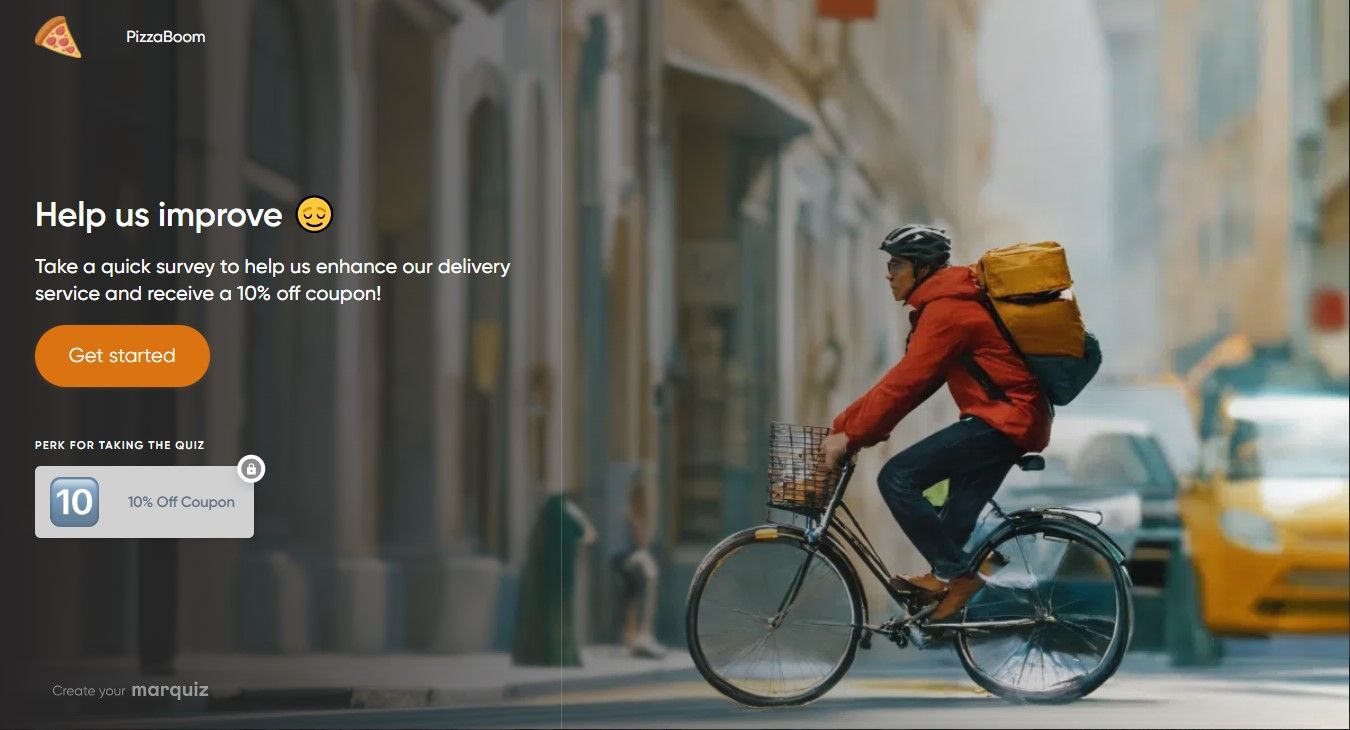
9. Optimize for Mobile Users
Most people take quizzes on their phones, so a mobile-friendly design is essential. Make sure buttons are easy to tap, scrolling is minimal, and layouts adjust smoothly across different screen sizes. Test your quiz on multiple devices to make sure everything works as expected. If it’s not optimized for mobile, you’ll lose a huge chunk of potential leads.
10. Track Performance and Continuously Improve
A quiz is not a set-it-and-forget-it tool, so regular analysis is essential. Review key metrics such as completion rates, lead volume, and average completion time to understand how visitors move through the quiz.
Pay attention to drop-off points. If a large share of users leaves at a specific question, it may be confusing, too personal, or unnecessary, and should be revised. You can also experiment with different elements, such as question order, contact form placement, or wording.
Even simple adjustments, like rephrasing “Enter your email” to “Get your results,” can noticeably lift overall performance over time.
Using Quiz Data for Segmentation and Personalization
Quiz responses provide clear signals about user needs, but the real value comes from how you apply this data across your marketing processes.
Automatic Segmentation
Quiz data can be used to automatically group leads based on their answers. You can separate contacts by experience level, budget, goals, or readiness to purchase.
For example, users who indicate they are just starting out can be placed into an educational segment, while those ready to invest can be directed toward more advanced offers. This structured segmentation allows for more relevant communication at every stage.
Personalized Email Flows
If someone's main goal is to improve English for work, send them business-focused lessons – not travel phrases. Use quiz answers to trigger conditional email sequences: beginners get foundational content, high-intent leads get course recommendations and offers.
This runs on autopilot. Set rules like "If result = budget-conscious, send discount emails. If result = premium seeker, highlight quality".
Lead Scoring for Sales
Assign points to answers that signal buying intent. "Need solution within 30 days" scores higher than "just exploring." Your CRM calculates totals automatically and routes hot leads straight to sales, while others enter nurture sequences.
Using Quiz Insights
If 60% of quiz takers select "limited budget," consider introducing more affordable options. Track which segments convert best and adjust your offers accordingly. Quiz data can influence your overall marketing strategy, not just how you tailor communication.
Shareability and Viral Potential
The best marketing is when your audience does it for you. A carefully built quiz doesn't just collect leads – it gets shared.
Make Results Worth Sharing
People share quiz results when they're surprising, relatable, or say something interesting about them. Personality-type results ("You're a Creative Innovator!") perform better than generic ones ("Here are some products") because they feel personal.
Design visually appealing result cards with bold colors, clean layouts, and shareable graphics. If your results look good, people want to post them. Ugly results stay private.
Remove Friction from Sharing
Add social sharing buttons directly on the results page with pre-written text and hashtags. Instead of making users write their own post, give them something like "I'm a Strategic Thinker! What's your type? #TakeTheQuiz".
The easier you make it, the more it gets shared. One click should be all it takes.
Leverage Social Proof
Partner with influencers or brand advocates to take your quiz and share their results. Their followers see it, get curious, and take it themselves, creating a ripple effect.
Encourage user-generated content by featuring quiz results in your own social posts. When people see others participating, they want to join in.
Track What Works
Monitor which quiz topics and result types get shared most. Use that data to refine future quizzes. Not every quiz goes viral, but the ones designed for sharing have a much better shot.
Quiz as Content Marketing
Most people don’t arrive ready to decide. Quizzes stand out because they act as content, not just a conversion tool. They replace passive reading with interaction and deliver value upfront. That’s what makes them effective in content marketing: they capture attention and hold it long enough to move users forward.
Here’s how it plays out in real cases:
Case Study 1: Online HR Training Courses
A company offering online HR training courses wanted to increase enrollments in India and the U.S. They launched an interactive quiz, “Receive Your HR Career Development Plan!”, with 8 targeted questions assessing career goals, experience, and HR knowledge. At the end of the quiz, participants received personalized course recommendations based on their answers.
The impact was clear: within three months, the quiz generated over 700 leads with a 36% conversion rate, significantly outperforming their previous lead generation efforts. Its success came from the quiz’s personalized approach, making users feel the training fit their needs.
Case Study 2: Children's Online Chess School
StepFuture, an online chess school for kids, wanted to attract more students worldwide. To do this, they introduced quizzes into their marketing strategy, using two different formats: a pop-up quiz on their website offering a 10% discount on subscriptions and a quiz-based landing page for ad campaigns, encouraging visitors to sign up for a free trial lesson.
Each quiz asked a few simple but relevant questions, such as the child’s age, their interest level in chess (casual or competitive), and their preferred schedule for the trial lesson. The goal was to create a personalized, low-pressure flow for parents considering chess lessons for their kids.
The results were significant:
- The pop-up quiz led to a 15% increase in clients.
- The quiz-based landing page brought in 30% more clients compared to a site without a quiz.
- Overall, the quizzes also lowered the cost per lead compared to traditional website forms and lead-generation ads.
This aligns with what we’ve seen across education niches, where quiz-based landing pages consistently outperform static forms by 20–30%. In both cases, the quiz didn’t bring in more traffic – it simply made existing interest easier to convert by adding structure to the decision stage.
Conclusion
Think of quiz marketing as more than just a way to collect leads. It can actually shape how people experience your brand. A quiz can explain things, keep someone interested for a bit, and make the brand feel a little more relevant before they even think about buying anything.
It’s also not something experimental anymore. Quizzes are already used as a practical way to get attention and bring in potential customers while learning more about them at the same time. When the questions make sense to the person taking it, they’re simply more willing to go through the whole thing.
As marketing shifts toward more user-driven formats, quizzes give brands a chance to stand out and work more efficiently with their traffic. But results don’t happen automatically. You still need to tweak things, test different versions, and see what actually works. The closer the quiz feels to what the user needs, the better it performs.


.jpg)